
How to Use Hiring Signals to Beat the "No Budget" Lie

The "No Budget" lie is the oldest play in the book. You reach out to a prospect, you have a solution that solves a legitimate pain point, and they shut you down with the classic script: "We aren't looking at that specific role right now," or "The budget just isn't there for new tools this quarter."
It's incredibly frustrating because you know they need it. But here is the thing: companies are rarely honest about their budget when talking to a salesperson. In a sales meeting, "no budget" is a defense mechanism. In a job board, the truth comes out.
It's actually insane how much we trust what a prospect says over what a company does. A company's job board is the most honest document it ever publishes. It is a raw, unfiltered list of their current pain points and exactly how much they are willing to pay to fix them. If they are hiring a specialist, they are signaling that they have an unsolved problem—and they've already found the cash to solve it.
Look, if a company is ready to drop $120k on a salary for a new Marketing Automation Specialist, the "no budget" excuse for your $15k software is a total fabrication. If they can afford the specialist, they can afford the tools that make that specialist effective. In this post, we're going to break down how to use hiring signals as the ultimate B2B intent data.
The Job Description is a Product Roadmap of Pain
Before we had modern research tools, sales was mostly "spray and pray." You'd pull a list of accounts based on industry and size, then start blasting emails. It was low-leverage, high-friction, and frankly, a waste of everyone's time.
Today, we have hiring signals. A hiring signal isn't just a notification that a company is "growing." It is "Hard Intent."
When you see a job posting, you aren't just looking at a headcount increase; you are looking at a roadmap of pain. A job description literally lists the problems the company is failing to solve internally. If the posting says, "Seeking a Manager to clean up our messy CRM data and automate lead routing," they have just handed you your discovery call on a silver platter.
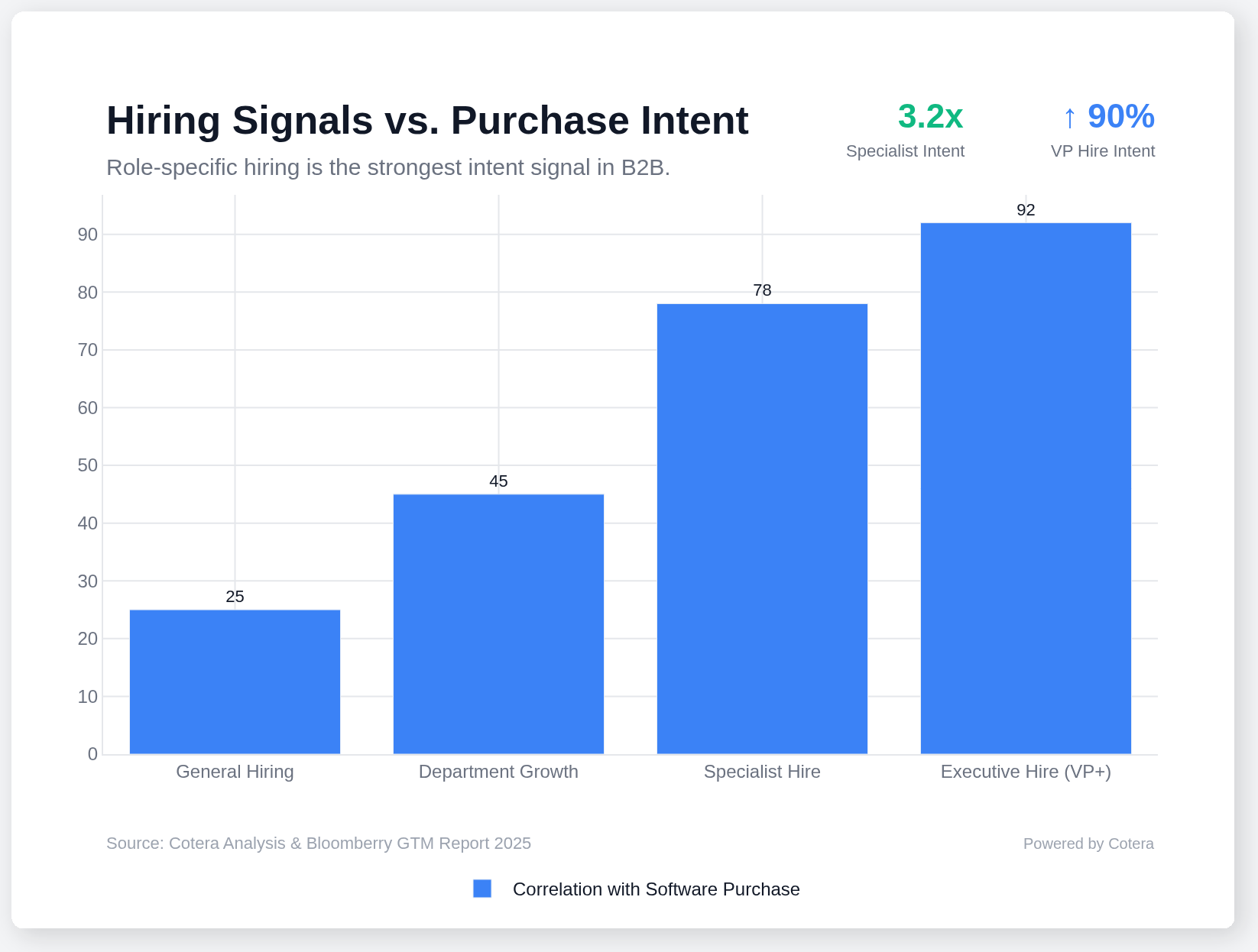
Research from Bloomberry recently analyzed over 1 million software purchases and confirmed what we've suspected: hiring is the strongest predictor of spend. Hiring a VP-level role is a 90% predictor of an upcoming software stack change within the first six months. Why? Because a new leader doesn't want to inherit the previous person's mess. They want a clean slate and their own tools to hit their KPIs.
But it's not just the VPs. The "Specialist Signal" is even more tactical. When a company hires a "SalesOps Analyst" or a "Marketo Specialist," they are signaling that they have the budget for the person and the underlying need for the tech. If you sell something that makes that specialist's job 50% easier, you are no longer a "nice to have." You are a necessity for that new hire's success.
Step 1: The Headcount Delta (How to Spot the Growth)
The first step in your research workflow is identifying where the money is actually flowing. You need to distinguish between "Maintenance Hiring" (replacing someone who left) and "Growth Hiring" (expanding the team).
Given a list of companies, you can check their headcount health using LinkedIn Premium or AI-powered tools like Cotera. What you're looking for is the "Headcount Delta"—the change in department size over the last 6 to 12 months.
If a company's overall headcount is flat, but their Engineering or Marketing Ops team is up 15%, that is a massive buying signal. It means the CEO and CFO have identified that specific department as the growth engine for the year. That is where the budget is.
When a prospect tells you "there's no budget," but their department headcount has grown by double digits in six months, they aren't telling you the truth. They have budget; they just haven't been convinced that your tool is a priority over their next hire. Your job is to show them that your tool makes their current (and future) hires twice as productive.
If you see a company growing its headcount while claiming budget cuts, you aren't fighting a lack of money—you're fighting a lack of relevance. Hiring signals give you the context to prove why you are relevant now.
Step 2: Role-Specific Intelligence (Reverse Engineering the Stack)
Once you've found the growth, you need to dive into the specifics of the hiring page. This is where you move from "I know you're hiring" to "I know exactly what you're struggling with."
Go to their hiring page, their jobs section, and their LinkedIn jobs tab. Look for the "Preferred Experience" or "Requirements" sections. This is how you reverse-engineer their tech stack without ever picking up the phone.
If they are hiring for a "Revenue Operations Manager" and they require "5+ years of experience with Marketo, Salesforce, and LeanData," you now know three critical things:
- They are a Salesforce shop.
- They use Marketo for automation.
- They are struggling enough with lead routing that they've invested in LeanData.
If you sell a tool that enhances any of those pieces, your pitch becomes surgical. You aren't just selling software; you are selling a way to maximize the ROI of the $120k hire they are about to make. You are selling a way for that new hire to hit the ground running on day one instead of spending three months untangling a messy database.
Step 3: Bypassing the Gatekeepers and Finding the DM
One of the biggest mistakes sales reps make is seeing a job post and reaching out to the recruiter listed on the ad. Stop doing that.
Recruiters are built to filter people out. They are focused on filling seats, not buying software. They don't care about your "attribution solution" or your "outreach platform."
Instead, use the job post to find the Hiring Manager. LinkedIn Jobs often displays exactly who posted the role. If they don't, it's easy to triangulate. If they are hiring a "Senior Marketing Automation Specialist," the Hiring Manager is almost certainly the Director of Marketing Operations or the VP of Demand Gen.
When you reach out to that person, your message shouldn't be a cold pitch. It should be a consultation. "I saw you're expanding the team and hiring a Marketing Ops specialist to solve X. Usually, when teams hit this stage of growth, they struggle with Y. We've helped companies like yours automate that part of the process so your new hire can focus on strategy rather than cleaning up data. Worth a quick chat?"
This approach changes the dynamic. You are no longer a pest; you are an expert providing value to a leader who is currently in the middle of a high-stress growth phase. You are showing them that you understand their organizational goals better than the competitor who just sent a "Checking in!" email.
Stop Spraying and Start Signaling
The era of "spraying and praying" is over. It's too expensive, it's too noisy, and the results are hitting diminishing returns.
Hiring signals allow you to be efficient. They tell you who is growing, what they are struggling with, and who has already received the "green light" from the CFO to spend money. If you aren't using headcount growth and role-specific hiring as your primary buying signals, you are leaving money on the table. You are letting your competitors walk in with data-driven insights while you're still trying to argue about "budget."
At Cotera, we're obsessed with this kind of organizational intent. We help companies stop guessing and start visualizing the actual implications of their market's data. We do the segmentation for you, so you can stop chasing dead leads and start talking to the people who are actively investing in their future.
The budget is there. You just have to know where to look.
Try These Agents
- Competitor Hiring Tracker — Track job postings to identify companies with budget and pain points
- Company Growth Analyzer — Monitor headcount changes and expansion signals
- Find Decision Maker — Identify the hiring manager behind job postings
- Job Posting Finder — Discover relevant job postings across your target accounts