
How to Automate Lead Routing So Reps Stop Fighting Over Leads
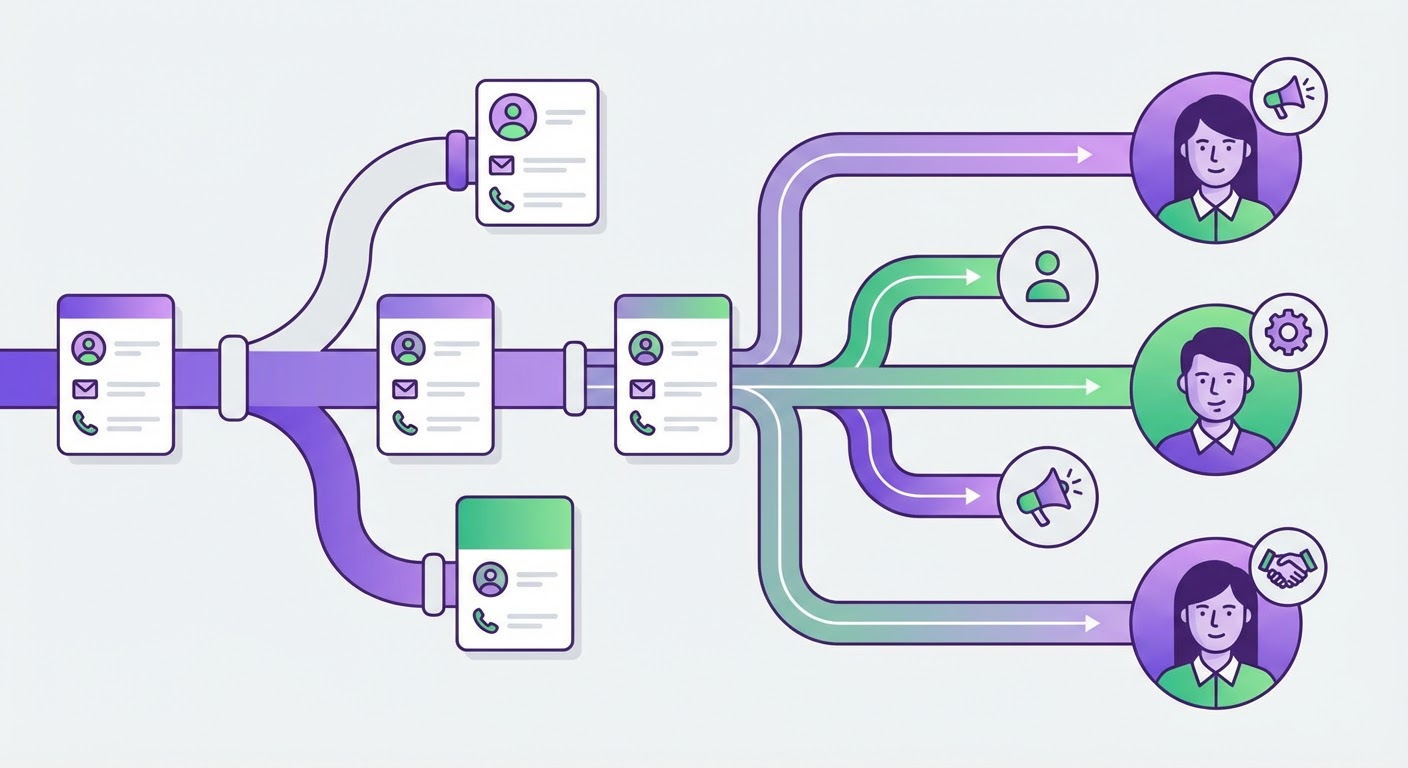
We had a lead come in last year. Enterprise account, demo request, $80k ARR potential. Two reps called them within 15 minutes of each other. Different pitches, different pricing, same prospect. The prospect told the second rep about the first call, asked why our company didn't know who was reaching out to whom, and went with a competitor. We lost $80k because of a routing problem.
That's when I stopped thinking about lead routing as a nice-to-have ops project and started treating it like the pipeline leak it actually is.
Most teams don't have a lead routing problem. They have a lead routing absence. Leads land in HubSpot and just... sit. Maybe a manager assigns them manually during their morning coffee. Maybe a rep F5's the queue fast enough to grab the good ones. I've seen it go both ways. Neither is a system. It's chaos with a CRM login.
The Real Cost of Bad Lead Routing
Speed-to-lead data has been beaten to death in every sales blog since 2019, so I won't rehash all the studies. But one number sticks with me: a Harvard Business Review study found that companies responding within five minutes were 100x more likely to connect than those responding within 30 minutes. A hundred times. Not a hundred percent. A hundred times.
When a lead sits unassigned for two hours because your routing depends on a human checking a queue, you've already lost. Not "maybe lost." The math says you lost. The lead filled out your demo form, you didn't call, and they moved on to the next vendor on their shortlist.
Bad routing also creates territory fights. I've watched senior reps cherry-pick high-value leads from the queue while junior reps get the leftovers. I've seen leads from the same company routed to different reps because one came through marketing and the other through the website. Both reps work the account separately, both send different proposals, and the prospect thinks your company is disorganized. Because it is.
What Good Lead Routing Looks Like
Automated lead routing has three requirements. If any of them is missing, the system breaks.
Speed. The lead should be assigned within seconds of entering your CRM. Not minutes. Not "during the next assignment cycle." Seconds. If your routing happens on a schedule (like a manager assigning leads every morning), you're losing every lead that came in overnight.
Context. The assignment should come with information. Not just "here's a new lead." More like "here's a new lead from a 200-person fintech company, they visited the pricing page three times this week, they use Salesforce and HubSpot, and the decision maker has been in role for four months." The rep who picks up the phone should already know something.
Fairness. Round-robin is the baseline. But smart routing goes beyond round-robin. Route enterprise leads to enterprise reps. Route inbound from specific industries to the rep who knows that industry. Route based on existing account ownership so the same company always goes to the same rep, regardless of which contact filled out the form.
Building the Routing Logic
I've landed on a four-layer routing tree after a lot of trial and error. Start with all four; you can always strip layers if they're overkill for your team size.
First, dedup and match. Before anything else, check if this lead already exists. If they do, send them to the existing owner. If another contact from the same company has an open deal, send them to that rep. This one step would've saved us the $80k disaster I mentioned.
Second, segment. Use enrichment data — company size, industry, geo — to bucket the lead. Enterprise goes to the enterprise pool. Mid-market to mid-market. SMB to SMB. Pretty obvious, but you'd be surprised how many teams skip this and just round-robin everyone into the same pool.
Third, assign within the segment. Round-robin is fine. Weighted round-robin is better. If Sarah has 80 open opportunities and Mike has 30, Sarah doesn't need more leads right now. Mike does.
Fourth, notify with context. The rep gets a Slack ping or email with the lead details and enrichment brief attached. Not a generic "new lead assigned" message. The actual company info, what pages they visited, what they look like as a buyer.
That whole sequence should happen automatically in under a minute. If any step requires a human to manually intervene, you'll have delays. Delays kill leads.
Where Teams Get Routing Wrong
I've helped maybe fifteen teams set up automated lead routing. The mistakes are remarkably consistent.
Over-engineering the rules. I watched one team build 47 routing rules with nested conditions. When a lead didn't match any rule, it vanished into a dead queue. Nobody checked that queue for three weeks. Roughly 15% of their leads went nowhere during that stretch. Keep the rules simple. Five rules covers 95% of scenarios. The other 5% can go to a default pool.
Not enriching before routing. You can't route by company size if you don't know the company size. You can't route by industry if all you have is an email address. Enrichment has to happen before routing, or you're routing blind. I've seen teams route by geography based on the person's IP address, which assigned a lead in Manhattan to the "Northeast" territory when the company was actually headquartered in Austin.
Ignoring existing relationships. When a lead comes in and another contact from the same company is already working with a rep, that lead should go to the same rep. Always. No exceptions. Account-based routing is how you avoid the "two reps calling the same CFO" situation. It's amateur hour when that happens and prospects notice immediately.
No fallback timer. If a lead gets assigned and the rep goes dark for 30 minutes? Reassign it automatically. Reps miss notifications. They're on calls, in meetings, or they left their laptop at home. Without a fallback timer, those leads just rot in someone's queue until the prospect has already signed with a competitor.
Why Use an Agent for This
The manual version of lead routing is a sales ops person watching HubSpot, checking each new lead, looking up the company, figuring out the right rep, and assigning it. When they're in a meeting or on vacation, leads pile up. When the team grows, the rules get complicated enough that only one person understands them. When that person leaves, the routing breaks.
An agent handles the whole chain. The contact enrichment agent pulls company data the moment a lead enters HubSpot, so routing decisions are made on enriched data, not just a name and email. The lead dedup agent catches duplicates and matches existing accounts before routing, preventing the double-contact disaster.
For the notification layer, the Slack deal alerts agent pushes assigned leads straight to the rep's Slack channel with context attached. No more checking a CRM queue. The lead comes to the rep with everything they need to make the call.
The result is leads that go from form fill to assigned rep in under sixty seconds, with enrichment data attached, duplicates removed, and existing accounts matched. The ops person who used to spend two hours a day on routing now spends zero, and the leads get worked faster because no human bottleneck sits between the form and the phone call.
Route Fast or Don't Bother
Lead routing is one of those things that's either automated or broken. There's no good middle ground. A manager manually assigning leads twice a day is just a slow, expensive version of round-robin. If you're going to do it, do it in real time with enrichment and dedup built in. If you're not going to do that, at least set up round-robin with a fallback timer so no lead sits unclaimed for more than 30 minutes. Anything longer than that and the data says the lead is already gone.
Try These Agents
- HubSpot Contact Enrichment — Enrich new contacts in HubSpot with company data for accurate routing
- Attio Lead Import & Deduplication — Deduplicate and match leads against existing accounts before routing
- Slack Salesforce Deal Alerts — Push assigned leads to reps in Slack with context and enrichment data