
How to Automate Pre-Meeting Research
I used to spend 20-30 minutes before every sales call Googling the prospect, checking their LinkedIn, reading their company's latest blog posts, and scanning for recent funding or product announcements. Multiply that by five calls a day and I was losing two hours of selling time to research. The research was necessary — walking into a call cold is worse than not having the call at all. But the process was stupidly manual for 2026.
The fix wasn't "do less research." It was "stop doing the research yourself." Every piece of pre-meeting prep I used to do manually can run in the background while I'm doing other things. Here's how.
What Good Pre-Meeting Research Looks Like
Before I automated anything, I needed to define what "good prep" actually means. Bad prep is reading the company's About page and calling it done. Good prep gives you something to say in the first two minutes that makes the prospect think "okay, this person actually understands my situation."
My pre-meeting research checklist:
- Company basics: what they do, how big they are, who their customers are
- Recent news: funding, product launches, leadership changes, anything from the last 90 days
- The person I'm talking to: their role, how long they've been there, what they post about on LinkedIn
- Their tech stack: what tools they already use (you can find this on BuiltWith or job postings)
- A specific talking point: one observation about their business that shows I did homework
That last one is the hard part to automate, but everything above it can run on autopilot.
The Automated Stack
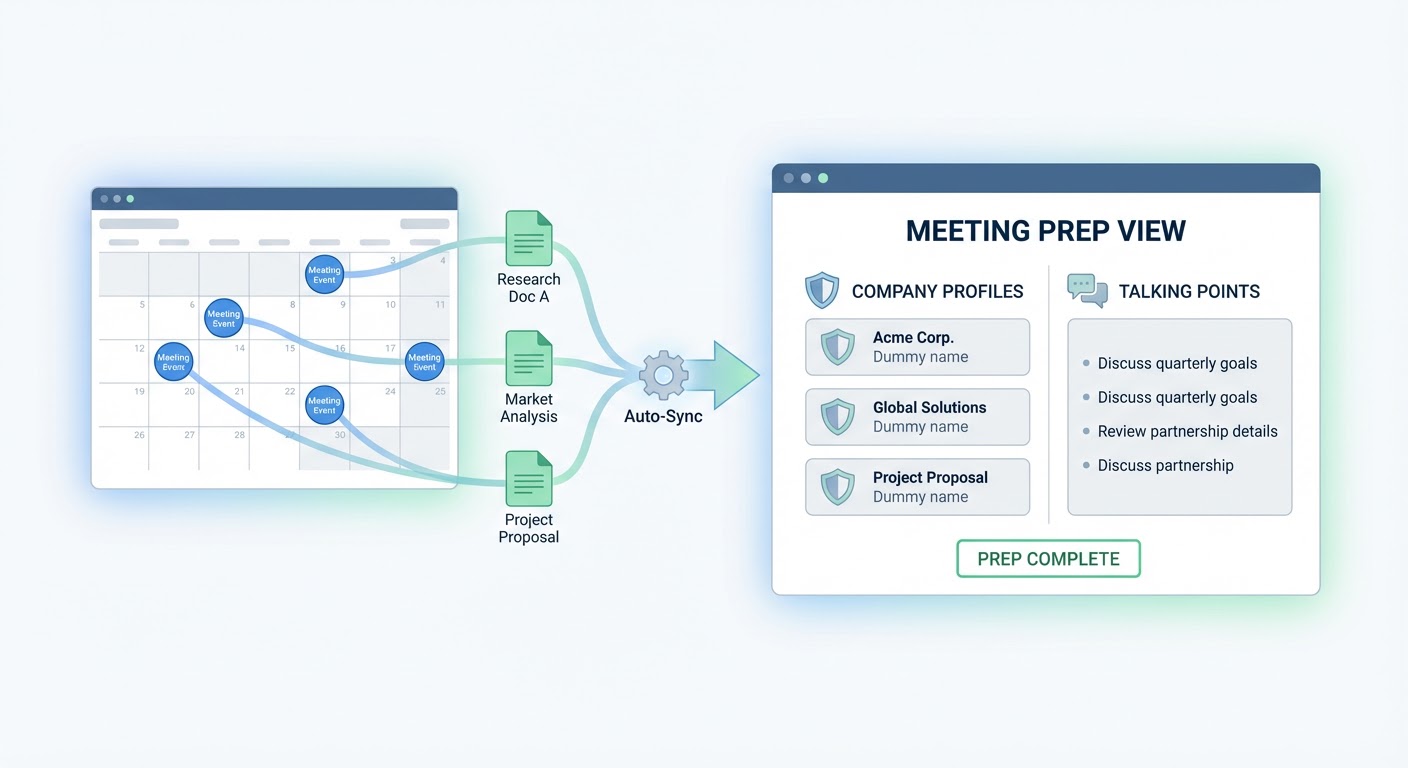
A pre-meeting research agent is the core of this. Feed it a company name and a contact name, and it pulls together a research brief — company overview, recent news, key people, and relevant context. I have mine output directly to Notion so there's a page waiting for me 30 minutes before each call.
The trigger is my calendar. When a meeting with an external participant appears on my calendar, the research kicks off. By the time I sit down for the call, there's a one-page brief sitting in Notion with everything I need. The research that used to take 20 minutes now takes zero minutes of my time.
For the company growth angle, a company growth analyzer adds hiring trends, headcount changes, and growth trajectory. A prospect at a company that grew from 50 to 200 people in the last year is in a different buying situation than one at a company that's been flat. Knowing that going into the call changes how I sell.
Leadership priorities finder is the one that gets me the best opening lines. It looks at what the prospect's leadership team has been saying publicly — earnings calls, conference talks, LinkedIn posts, blog articles — and distills their priorities. When I can open a call with "I noticed your CEO mentioned on LinkedIn that reducing churn is the top priority this quarter," the conversation starts at a completely different level than "tell me about your challenges."
What This Actually Changes
The time savings are obvious. Two hours a day recovered across a sales team of eight reps is 16 hours of selling time recovered. Per day. That math gets absurd fast.
But the quality improvement matters more than the time savings. When I was researching manually, I'd sometimes rush it. Five minutes of lazy Googling instead of 20 minutes of proper research because I had back-to-back calls. The automated version doesn't cut corners. Every call gets the same depth of prep because the agent doesn't get tired at 4 PM.
My connect rates improved too. Not directly from the research, but from the confidence that comes with walking into every call prepared. I stopped starting calls with "so, tell me about your company" — which is basically admitting you didn't bother to prepare — and started with "I noticed you recently expanded into the European market. How's that going?" Night and day difference in how prospects respond to the first two minutes.
Common Mistakes
The biggest mistake I see teams make with automated research is generating a 10-page dossier for every call. Nobody reads 10 pages. The research output needs to be one page max. Company snapshot, three bullet points of recent context, and one suggested talking point. If a rep can't scan it in 60 seconds before the call, the format is wrong.
Another mistake: not updating the research close to the call time. A company that raised a Series B three weeks ago is old news. Research generated at the time of booking might be stale by the time the meeting actually happens. I run the research agent 30 minutes before each call so the news and LinkedIn activity are current.
Don't automate the thinking. The research gives you ingredients. The recipe — how you use that information in conversation — still requires a human brain making judgment calls about what to mention and what to skip. Automation handles the gathering. You handle the application.
Try These Agents
- Pre-Meeting Research — Automated research briefs delivered before calls
- Company Growth Analyzer — Hiring trends and growth trajectory data
- Leadership Priorities Finder — What the prospect's leadership cares about
- Crunchbase Account Research — Funding and company profile data