
How to Automate Sales Call Follow-Ups
I pulled our CRM data once and found something ugly: 23% of our completed sales calls had zero follow-up sent within 48 hours. Nearly one in four prospects had a conversation with us and then... nothing. Radio silence. We were lighting pipeline on fire through sheer forgetfulness.
The reps weren't slacking. They were drowning. Five calls before lunch, a working lunch, four more calls in the afternoon. By 5 PM they've forgotten what they promised the 10 AM prospect. The follow-up email never gets written because there's always another call starting in three minutes. I stopped blaming reps and started blaming the process.
What Actually Needs to Happen After a Call
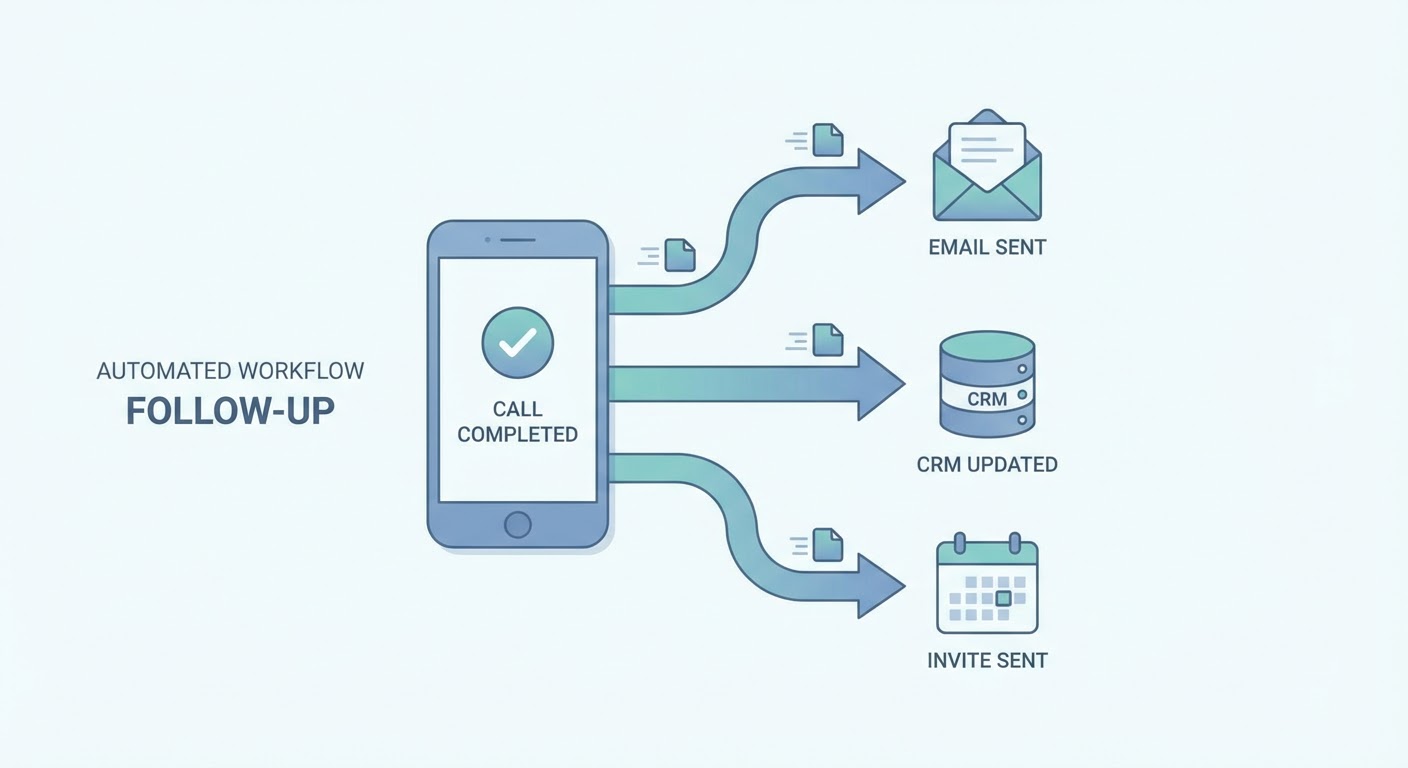
Three things, within an hour. A summary email to the prospect so they know you were paying attention. CRM notes so your manager doesn't ask "what happened with Acme?" during the pipeline review. And next step tasks — send the proposal, book the follow-up, loop in a solutions engineer. That's 15-20 minutes of admin work per call. Five calls a day, you're losing almost two hours to typing.
Automated Call Summaries
You're already recording your calls, right? If not, start there. Once you are, a call insights analyzer can spit out a structured summary within minutes of hanging up. It grabs the stuff your rep would otherwise forget — the pricing objection that came up at minute 23, the mention of a competing vendor, the prospect saying "we need this implemented before our Q3 board meeting."
That summary becomes the follow-up email draft. The rep skims it, fixes anything weird, hits send. What used to be a 10-minute writing exercise becomes a 60-second review. That's why it actually gets done now instead of sitting on the rep's to-do list until midnight.
The summary also goes to Slack. A Gong call summary to Slack drops highlights into a team channel so your VP of Sales can see what happened on every call without attending them or nagging reps for updates. My manager stopped asking me "how'd the Acme call go?" because the answer was already in #sales-calls.
Automatic CRM Updates
After a call, the deal record needs updating: new notes, updated stage if applicable, revised close date if the timeline changed, and any new contacts mentioned during the conversation. Reps skip this because it feels like paperwork (it is paperwork).
A Gong Salesforce deal updater does this. It hears "we need to get CFO sign-off before committing" and suggests pushing the close date out two weeks and adding a note about executive approval. Rep clicks confirm. Done. Ten seconds instead of five minutes of clicking through Salesforce fields.
The difference this makes to forecasting accuracy is wild. Our pipeline went from fiction (updated on Fridays from half-remembered call details) to something I could actually trust for board reporting.
Next Step Automation
You know those calls that end with "great, let's reconnect soon" and then both sides forget? Yeah, that's where deals go to die. The call summary agent catches agreed-upon next steps and creates them automatically — the calendar invite for the follow-up meeting, the task to send pricing, the reminder to bring in a solutions engineer.
My reps stopped losing deals to "we just forgot to schedule the next meeting." It sounds absurd that a multi-thousand dollar deal would die because nobody sent a calendar invite, but it happened more than I want to admit. Now the invite goes out 30 minutes after the call ends, every time, with no rep effort.
Prospects notice this too. Getting a detailed summary email and a calendar invite within an hour of a call? That's memorable. Our competitors were still sending "thanks for the chat, let me know if you have questions" two days later. One prospect told our rep she chose us partly because we seemed "way more organized." We weren't more organized. We were more automated.
Getting Buy-In From Your Sales Team
Reps resist new tools. That's reasonable — they've been burned by tools that promise to save time and instead create more work. The pitch for follow-up automation is simple: "you'll never write a call summary email from scratch again, and your CRM will update itself." Lead with the time savings, not the data quality benefits. Reps care about their time. Managers care about data quality. Sell the right benefit to the right audience.
Try These Agents
- Call Insights Analyzer — Auto-generate call summaries and insights
- Gong Call Summary Slack — Post call highlights to team channels
- Gong Salesforce Deal Updater — Automatic CRM updates from call intelligence
- Pre-Meeting Research — Prepare for the next call automatically