
People think they want AI Agents — they actually want workflows
Everyone's talking about AI agents like they're the answer. But if you've actually tried to run your business on one, you've hit the wall — it works once, like magic, and then does something completely different the next time.
The problem isn't the AI anymore. It's that agents and workflows are different things, built for different jobs.
Agents explore. Workflows deliver.
Agents are great — almost magical — at figuring things out. Give one a messy, open-ended task and it'll reason its way to an answer. But ask it to do that same task tomorrow, the same way, reliably? That's where it falls apart.
Workflows are the opposite. Hard to set up, but once they're running — they run. Same steps, same tools, same result.
The mistake most people make is reaching for an agent when what they actually need is a workflow. Doing so is natural. It's more fun to define an agent — more vibes in it for the author — but that doesn't make it the right choice. We think you don't have to choose between the two, though. Why not have both?
The real issue with LLMs and agents is trust
Obviously, the quality of their work can sometimes be an issue. But when they do a good job, there's still an issue — truly automating work requires trust. The same way delegating to a colleague requires confidence that they'll do it well, consistently, without you checking every step.
That trust is hard to build with a system that behaves like a black box. Workflows change that. They make the process visible — you can see exactly what runs, in what order, with what tools. That visibility is what builds confidence. And confidence is what lets you actually let go.
Anthropic just shipped dynamic workflows in Claude Code — Claude now writes its own orchestration scripts and fans work out across parallel tasks. It's a genuinely good step forward. But for businesses that need to run the same process reliably, day after day, it still misses the mark.
If you can't predict what the system is going to do, you end up reviewing every run before it happens — which defeats the point. You want to review the workflow, once, not audit the output, every time.
You don't always want one or the other — you probably want both
The best setups use both. An agent explores the problem and figures out the steps. Those steps become a workflow. The workflow runs reliably, every time — and can even call agents as part of its process when it hits something that needs reasoning.
At Cotera, we've thought about this for a while. Making AI work reproducibly at scale is basically what we do. It's also why we're sceptical of leaning too hard on MCP alone — it's powerful, but it's a bit hand-wavy. When you define an automation with explicit tool references, the agent is less likely to go off-script. You get consistency without sacrificing flexibility.
And as a bonus — explicit workflows use far fewer tokens than letting an agent reason its way through the same task every time.
Side note — can we please agree that tokenmaxxing is a terrible metric for agentic productivity 😂.
How do you know when something should be a workflow or an agent?
It's a feature we built into our agent, Coco: it proactively looks at your agent definitions and their run history to identify which ones are good candidates for becoming workflows. So you don't have to figure it out yourself — the system nudges you toward reproducibility as you go.
But the core idea is that agents are best when the work is exploratory, judgment-heavy, or open-ended; workflows are best when the work is repeatable, bounded, and operationally important.
There's a rough system we use to figure out whether something should be a workflow:
1. Does it always have to send data somewhere?
If the agent's work consistently ends with "and then update/send/create/log this somewhere," that's another sign.
Examples:
- Create a support ticket.
- Update a HubSpot property.
- Send a Slack message.
- Add a row to a database.
- Draft and send an email.
- Sync data between systems.
- Generate a report and file it somewhere.
2. Does it always have to fetch from the same sources?
If the agent repeatedly gathers context from the same places, that context-gathering can often be made explicit.
For example, every time it runs, it checks:
- The customer's profile in the CRM.
- Recent support tickets.
- The latest invoice.
- Internal docs.
- Product usage events.
- A spreadsheet or database table.
3. Are its decisions enumerable?
This is probably one of the biggest signals.
If the agent's "judgment" is mostly choosing between known options based on known fields, it may not need to operate as a fully open-ended agent.
For example:
- If
plan = enterprise, route to the account team. - If
sentiment = angryandcustomer_value = high, escalate. - If
renewal_date < 30 days, create a renewal task. - If
lead_score > 80, send to sales. - If
issue_type = billing, assign to finance support.
Tangible benefits of workflows
There are a couple of very tangible benefits that we think workflows provide. One is trust, which we discussed already, and the other is cost.
Often, when an LLM queries data from an MCP server or an API, it gets back much more data than it needs. That leads to context bloat and inflated token usage.
In workflow format, we can reduce the data before it reaches the agent. Instead of passing through every field from HubSpot, Clearbit, and internal systems, the workflow defines the exact input schema the agent needs.
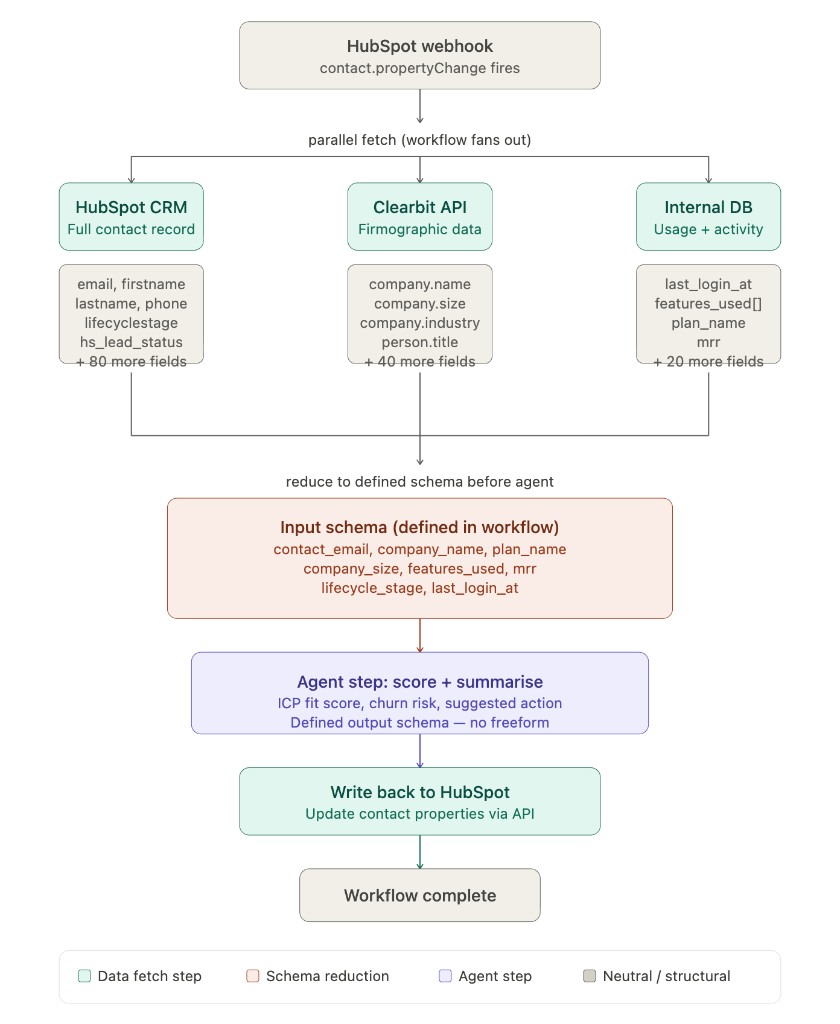
That means the agent gets the signal, not the sludge.
In this example, the unrestricted agentic approach would pass around 3,820 input tokens per run before the model even starts reasoning.
| Source / Item | Estimate |
|---|---|
| HubSpot contact (all default properties) | ~175 fields |
| Clearbit person + company enrichment | ~85 fields |
| Internal DB (usage + billing) | ~25 fields |
| Avg tokens per field (key + value + structure) | ~12 tokens |
| System prompt + task instruction | ~400 tokens |
| Total input tokens per run | ~3,820 tokens |
By reducing the input to the defined workflow schema, our back-of-the-envelope calculation suggests around 87% fewer tokens per run.
If you were to run that workload 1k times per day on a Claude Sonnet model in an agentic-only manner, it'd cost you around $171 per month. If you were to run it in a workflow with selective inputs, it would cost you $22 per month — and you'd know that it did the same thing each time.
There's the win we're after: lower cost, higher reliability, and fewer surprises.
Conclusion
Many of us have run into unexpected costs due to LLMs, and also LLM bills that don't seem to justify the outputs. We've all had LLMs do some pretty random things that could, in other scenarios, have turned out quite badly.
So perhaps LLMs don't just have a trust problem — they have a trust and cost-scaling problem. At lots of SMEs, people struggle to justify using LLMs for large-scale automated work due to both of those issues.
Workflows alone aren't the answer, though, as they can be brittle and laborious to define. It's why I've never quite convinced myself to automate my entire life using Zapier.
However, agents + workflows + agents that create workflows?
That could be pretty sweet.
Try These Agents
- HubSpot Contact Enrichment — Fetch CRM context, enrich contacts, and write structured updates back to HubSpot
- Signal-Based Outreach Router — Route leads based on enumerable rules instead of open-ended agent guesses
- CRM Bulk Enrichment — Run the same enrichment steps across hundreds of records with predictable inputs
- Zendesk Ticket Escalation to Slack — Fetch ticket context, apply escalation rules, and notify the right channel every time