
How to Build an AI Sales Agent (That Actually Does Useful Work)

Last spring I decided to build an AI sales agent from scratch. Not buy one — build one. Grand vision: a single system that would research prospects, draft outreach, handle follow-ups, and update Salesforce while I sipped coffee and watched the pipeline fill itself. I spent a weekend stitching together GPT-4 prompts, a 34-step Zapier flow, a Salesforce API connection, and an Apollo integration. By Sunday night it technically worked. By Wednesday it had emailed a prospect's CEO with a message addressed to someone who'd left the company in 2023, logged a deal to the wrong account, and sent a follow-up to a customer we'd already closed.
My co-founder's Slack message was three words: "Turn it off."
That disaster taught me something I wish someone had told me before I burned a weekend on it. You don't build one AI sales agent. You build several small ones, each handling a specific job, and you wire them together. The all-in-one approach sounds elegant. In practice, it's a grenade with a loose pin.
The All-in-One Trap
Every few months I see a new vendor promising an autonomous AI SDR that does everything. Research, outreach, qualification, objection handling, meeting booking, CRM updates — the whole cycle, soup to nuts. The demo always looks amazing. A name goes in, a booked meeting comes out. The audience claps.
Then you deploy it against your actual prospect list and reality hits. The research is shallow because the agent is optimized for breadth, not depth. The emails are generic because writing genuinely personal outreach requires context the agent doesn't have. The CRM updates are wrong because mapping fields between six systems is a nightmare even for humans.
The fundamental problem is scope. An agent that does ten things does all ten at maybe 60% quality. An agent that does one thing can hit 95%. When that one thing is updating Salesforce deals from Gong calls, the difference between 60% and 95% accuracy is the difference between trustworthy pipeline data and your VP of Sales calling an emergency meeting.
I've talked to fifteen-ish teams who tried the all-in-one route. Every one scaled it back within a quarter. One system doing ten jobs means one bug breaks ten things. When our Salesforce sync agent had an issue last month, our research agent and alert agent kept running fine. Isolation is a feature.
The Composable Approach: Specific Agents for Specific Jobs
Here's what actually works: think of your sales workflow as a series of discrete tasks and assign an agent to each one. Each agent is dumb in a good way. It knows how to do its one thing, it does it reliably, and it doesn't try to be clever about things outside its scope.
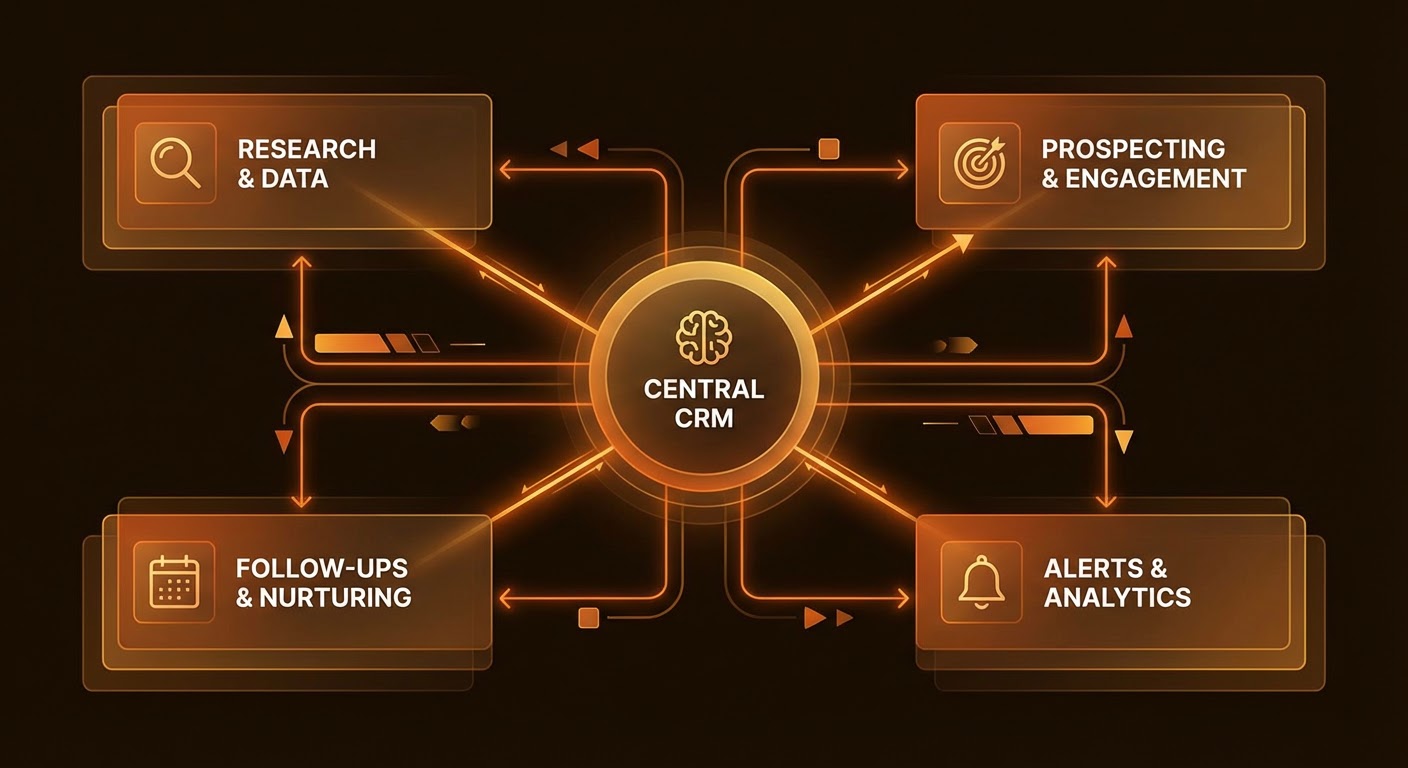
I break the sales workflow into four zones:
- Research — Everything before you talk to a prospect. Company data, funding history, tech stack, recent news, job postings. A good research agent replaces two hours of tabbed browsing with a two-minute pass.
- CRM sync — The admin tax. Deal stages, call notes, syncing Gong to Salesforce. My reps spent 30-40% of their day on this. Now roughly zero.
- Follow-ups — Post-call emails, drip sequences, breakup emails. The agent drafts; the rep reviews and sends. I'm not letting agents send emails autonomously. That's how you end up apologizing to a prospect's CEO.
- Alerts and signals — Watching target accounts for changes. Someone raised a round, hired a new CTO, posted a job for the role your product replaces. The rep gets a ping with context, not a raw notification they'll ignore.
Each zone gets its own agent connected to the specific tools it needs. They don't share state, they don't know about each other, and when one breaks the others keep working.
Getting Specific About Each Agent
"Build agents for your workflow" is the kind of advice that sounds useful and isn't. Let me get concrete.
The research agent takes a company name and returns a structured brief: firmographic data from Apollo, recent funding, open job postings that signal buying intent, news from the last 90 days. Your rep gets this before every call. They used to walk in blind. Now they walk in knowing the prospect just churned off a competitor and posted about it on LinkedIn.
The CRM sync agent runs after every Gong call. Pulls the summary, extracts action items, maps them to the right Salesforce deal, updates the stage, posts a digest to Slack. Before this, our Salesforce data was fiction. Reps batch-updated deals on Friday from memory. Now the CRM reflects reality within five minutes.
The follow-up agent drafts post-call emails from the Gong summary. References what the prospect actually said, includes materials they requested, flags commitments. The rep edits and sends. Three minutes instead of fifteen.
The signal agent watches target accounts for changes — new exec hire, funding announcement, job posting. The alert goes to Slack with context attached, so the rep can act immediately instead of spending ten minutes figuring out why they got a notification.
Wiring It Together
The practical question everyone asks: how do these agents actually talk to each other?
They mostly don't, and that's on purpose. Each agent runs independently on its own trigger. The research agent fires before scheduled calls. The CRM sync agent fires when a Gong recording is ready. The signal agent runs on a daily cron. They all write to shared systems — Salesforce, Slack, HubSpot — but they don't depend on each other's output.
If you need agents to chain — research feeding into follow-up, say — keep the handoff dead simple. Research agent writes a brief to a known location. Follow-up agent reads from it. If research fails, follow-up still works; the rep fills the gap manually.
The teams that over-engineer this end up with a Rube Goldberg machine that breaks when one API rate-limits. Keep connections loose. Let humans be the glue for edge cases.
Why Use an Agent
You could do all of this manually. Plenty of reps do — twelve tabs, copying data between systems, typing call notes from memory. The issue isn't capability. It's consistency.
I tracked our team's admin time before we built these agents. 3.8 hours per rep per day. Research, CRM updates, note-taking, data entry. Nearly half a workday on things that don't generate a single dollar of pipeline.
With an AI prospecting agent, pre-call research that used to take twenty minutes per prospect takes about ninety seconds. The Apollo to HubSpot pipeline builder eliminates the tab-switching marathon of searching Apollo, verifying contacts, deduping against HubSpot, and loading records one by one. And the Gong to Salesforce deal updater means our CRM actually reflects what happened on calls instead of what reps vaguely remember on Friday afternoon.
Four reps getting 3.5 hours back per day is 70 hours a week. Almost two full-time headcount worth of selling time recovered from admin. We didn't hire more reps. We just stopped wasting the ones we had.
The Short Version
Don't build one agent that does everything. Build small agents that each own one part of the workflow — research, CRM sync, follow-ups, signals. Keep them independent so one failure doesn't cascade. Let your reps be the connective tissue for judgment calls. The goal isn't replacing the rep. It's getting them out of admin hell.
Start with research. Fastest time-to-value, lowest risk. Then CRM sync. Then follow-ups. Then signals. Each one is a standalone win. Together, they give your reps their afternoons back.
Try These Agents
- AI Sales Prospecting — Automate prospect research, firmographic data pulls, and pre-call briefings
- Apollo to HubSpot Pipeline Builder — Search Apollo for ICP matches and push enriched contacts straight into HubSpot
- Gong to Salesforce Deal Updater — Sync Gong call insights to Salesforce deals automatically