
AI Agents Belong Next to Your Data Warehouse, Not Inside Your Dashboard
Most of the AI showing up in analytics products this year is aimed at the wrong place. It's stuffed inside dashboards, helping people ask questions about the charts they were already looking at. That's useful. It just isn't where operational work actually happens.
The place your team decides what to do lives one layer down. In the warehouse. In the SQL that already defines which accounts are at risk, which leads are worth chasing, which transactions look off, which support tickets need someone senior on them. That's the data agents should be reasoning about, and it's where agents should be running from.
Dashboards aren't the villain here. They're great for what they're for — monitoring, alignment, executive visibility. Just don't confuse "the place people look at metrics" with "the place work actually gets done."
Dashboards show signals. The warehouse defines work.
RevOps writes lead-scoring dbt models. Finance flags anomalous transactions overnight. CS tracks health scores and usage drops. Support joins ticket data to product usage. Marketing builds campaign cohorts from event data. That logic lives in the warehouse long before it ever appears on a chart, and it's what actually drives operational decisions. The SQL behind those models answers questions like:
- Which accounts crossed the health threshold this week?
- Which inbound leads look like our ICP?
- Which transactions look suspicious before they settle?
- Which support tickets need escalation today?
Dashboards surface the output — charts, filters, drill-downs — and that's genuinely useful. But the definition of what matters (the joins, the thresholds, the segments, the actual business logic) is warehouse-native. If you want AI to help with operational work, you may as well meet the definition where it already lives instead of two abstractions higher up.
The dashboard is the wrong container for agentic work
BI copilots have got a lot better. They'll explain a spike, suggest a filter, generate a plausible-sounding paragraph about last quarter's numbers. Good enough for exploration. Fine for a read-only "help me understand this."
They struggle when the goal shifts from understanding something to doing something about it. A few reasons:
- Dashboards are for humans scanning charts, not for systems picking 400 rows and running multi-step work on each one.
- The action lives downstream anyway. By the time something appears on a dashboard, someone still has to export it, copy it, or wire glue code to actually do anything with it.
- Production agents need to be predictable and auditable, which a chat box embedded in a report isn't going to give you at any real scale — retries, rate limits, tool permissions, consistent behaviour across thousands of rows.
BI tools are good at BI. Agentic operational work is a different job, and jamming agents into dashboards mostly reduces them to chart summarisers or NL query helpers. Both fine. Neither is what we're talking about.
What warehouse-adjacent agents actually look like
The pattern's simple. Pick the work in SQL. Call a predefined agent. Do something with the result.
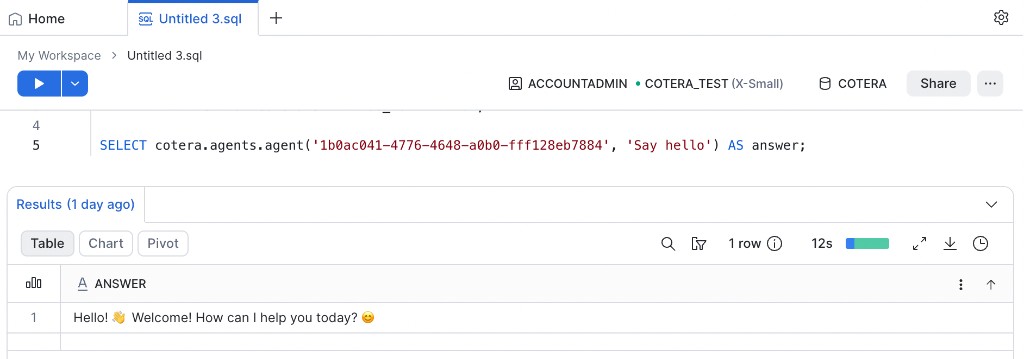
Snowflake picks which records get agent work. Cotera runs the agent — predefined instructions, scoped tools, retries, integrations — and the result comes back to the query so you can operationalise it instead of exporting it into yet another tool.
Same division of labour as Run AI Agents from Snowflake with Cotera. Install the app from the Snowflake Marketplace (install guide), connect your workspace, and call agents from SQL:
SELECT cotera.agents.agent('<your agent id>', prompt) AS answer
FROM prompts;
A more production-shaped query joins warehouse data to build the prompt per row:
SELECT
  account_id,
  company_domain,
  cotera.agents.agent('<your agent id>', company_domain) AS growth_analysis
FROM analytics.crm_accounts
WHERE pipeline_stage = 'discovery'
  AND growth_analysis_at IS NULL;
SQL picks which companies to research. The agent decides how, with approved tools — not whatever prompt someone happened to paste in that afternoon.
Finding your agent ID
Every cotera.agents.agent() call needs the agent's UUID. In the Cotera app, open the agent you want to call from Snowflake, then:
- Open the command palette —
Cmd+Kon Mac,Ctrl+Kon Windows - Search for Developer details
- Copy the Agent ID and paste it into your SQL in place of
<your agent id>
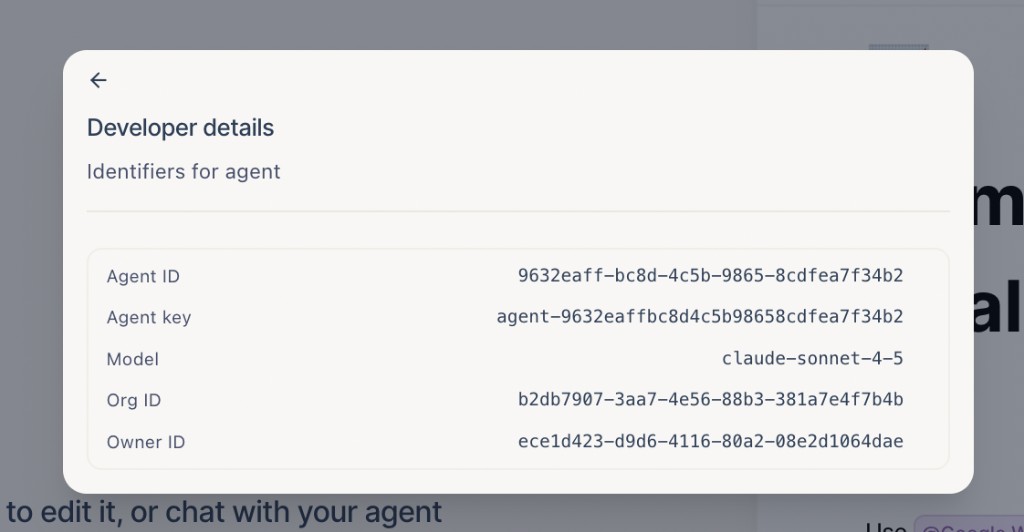
That's the value Snowflake passes to cotera.agents.agent(). If you copied an agent from Solutions, open it in your workspace first — the ID is specific to your org's copy of the agent.
Four shapes teams actually use
Mostly the same patterns show up over and over. Full SQL examples in Run AI Agents from Snowflake with Cotera.
Row-wise analysis
Every record gets its own take. One account, one agent run, one output. Good for growth research on inbound leads, churn risk on at-risk accounts, fraud reviews on flagged transactions.
Aggregate analysis
One prompt for the whole cohort, one summary back. Good for segment briefings, competitive landscapes, executive summaries of a batch rather than a row-at-a-time slog.
Row-wise action
Each row triggers an agent that doesn't just return text — it enriches CRM fields, posts to Slack, creates tasks, pulls live data from third-party APIs. This is where reliability starts to matter. Rate limits, retries, and partial failures are normal at scale.
Aggregate action
Cohort-level prompt, shared output that drives coordinated action. A weekly competitive brief posted to a channel. A segment report filed for leadership. A batch of CRM updates from a single research run.
Analysis and action both work. The warehouse pattern supports both. The mistake is treating every case as "summarise this dashboard."
Answers vs. actions
Different tools solve different problems. None of these are wrong; they're just aimed differently.
| Capability | BI copilots / dashboard AI | LLM functions in SQL | Reverse ETL / sync tools | Cotera agents |
|---|---|---|---|---|
| Explain metrics and charts | Strong fit | Limited | Not the job | Possible, but not the point |
| Natural-language warehouse Q&A | Growing capability | Strong fit | Not the job | Not the primary use case |
| Select work from warehouse models | Indirect | Native | Native (batch sync) | Native via SQL |
| Call external APIs and tools | Limited | Not supported | Fixed connectors | Core capability, scoped per agent |
| Predefined process and permissions | Ad-hoc chat | Prompt-dependent | Rule-based | Agent instructions + workflow runtime |
| Retries, rate limits, observability | Varies | Your problem | Varies by vendor | Built into agent runtime |
| Multi-step workflows with state | Manual | Manual orchestration | Pipeline-based | Agent + workflow execution |
Use BI AI when the work stays inside the report. Use LLM SQL when the work is in-warehouse text ops on data you already have. Use reverse ETL when you need deterministic sync between systems on a schedule.
Use warehouse-adjacent agents when the work needs judgement and action — with tools, reliability, and a predefined process your team can review once and trust at scale.
Agents you can trust, not chatbots you cross your fingers over
Production agent work shouldn't depend on whoever wrote the prompt that day. Agents are defined once in Cotera — approved tools, reviewed instructions, an output shape you expect.
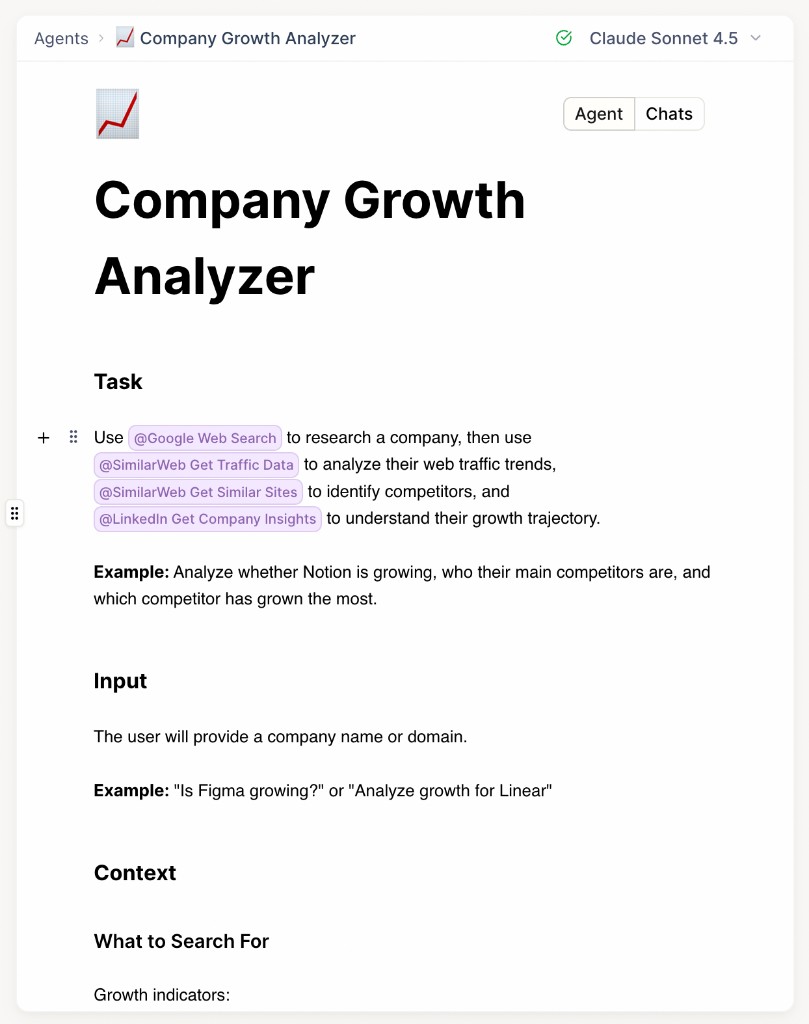
You don't have to build them from scratch. Solutions has 175+ prebuilt agents for lead research, CRM enrichment, support triage, competitive intel, and more. Copy one in, grab the agent ID, call it from SQL. The Company Growth Analyzer is a good one to start with — Google search, SimilarWeb traffic data, LinkedIn headcount insights, and competitor mapping all wired in as approved tools.
Your warehouse query stays boring and stable. The agent stays scoped and observable.
Reliability is the actual work
The gap between a demo and production isn't model quality. It's what happens when a third-party API 429s, an OAuth token expires halfway through a job, a workflow needs to resume without duplicating what already ran, and someone has to figure out what actually happened at 8am on a Monday.
That's why "just call an LLM from SQL" or "paste rows into a chatbot" quietly falls apart at volume. Real row-wise and aggregate work wants retries, rate-limit handling, state, observability, and consistent behaviour every run.
We wrote this out properly in Why Reliable AI Workflows Are Hard to Run From the Data Warehouse. Short version: the warehouse is the right place to pick work; you still need a runtime built for running it.
Snowflake picks. Agents do.
The framing that holds up in production:
- Dashboards show what happened. Signals for humans.
- The warehouse defines what needs attention. Operational logic in SQL.
- Agents analyse and act. Tools, reliability, predefined behaviour.
Complementary to BI and in-warehouse LLM functions, not a replacement for either. Cortex and its equivalents are good at summarising, classifying, and querying data you already have. Cotera is what you use when the work needs to leave the warehouse — enrich a CRM record, post to Slack, hit an external API, chain a few tools together. Your existing warehouse permissions and RLS still apply to the data you're selecting. Cotera handles everything after the agent runs.
Conclusion
If your team already uses the warehouse to decide what matters, the next step for operational AI probably isn't another dashboard copilot. It's agents that turn those SQL selections into actual analysis and actual action.
Dashboards explain what happened. Your warehouse knows what needs attention. Agents should help you decide what to do next — and, more usefully, actually do it.
Run AI agents at warehouse scale with Cotera →
Try These Agents
Browse the full catalog on Solutions, or start with these:
- Company Growth Analyzer — Research company growth, traffic trends, headcount signals, and competitive landscape from a domain
- Lead Enricher & Qualifier — Qualify inbound leads from CRM and warehouse data with structured scoring
- Vitally Churn Risk Detector — Flag at-risk accounts with structured risk assessments and recommended CSM actions
- Market Intelligence Agent — Monitor competitors, hiring patterns, and market moves across your target accounts