
How to Find Your Competitor's Traffic Sources (and What Each Channel Reveals)
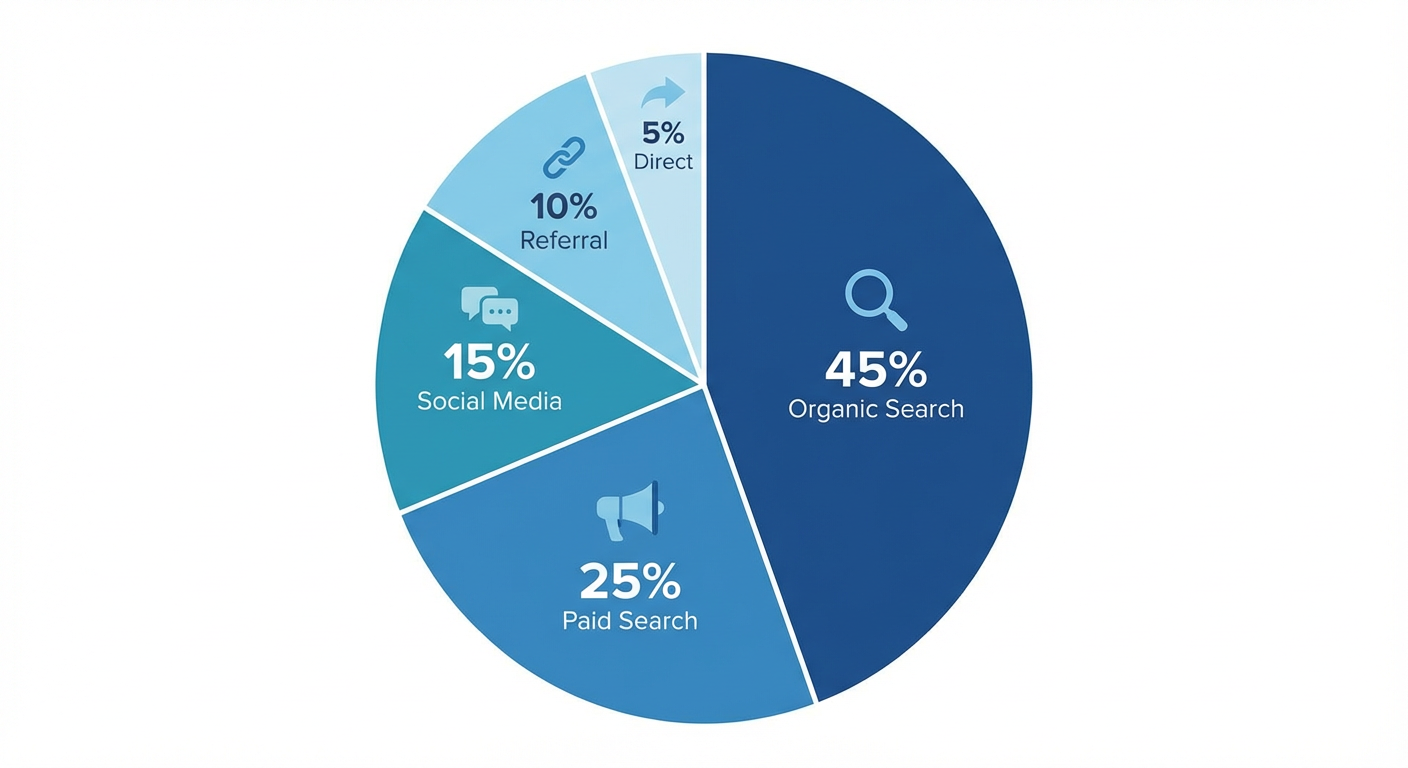
Knowing how much traffic a competitor gets is mildly interesting. Knowing WHERE it comes from is actually useful. A competitor pulling 500k monthly visits sounds intimidating until you realize 80% is branded search (people already know the name) and their non-branded organic is actually smaller than yours.
The channel breakdown changes everything. It tells you what they spend money on, which acquisition channels they've cracked, and which ones they quietly abandoned. Let me walk through how to get that data.
SimilarWeb: The Free Starting Point
SimilarWeb's free tier gives you more competitor traffic data than anything else that's free. Plug in a competitor's domain and you get an estimated traffic overview with a full channel breakdown.
The free version shows:
- Total estimated visits (take this with a massive grain of salt, accuracy is rough)
- Traffic share by channel: direct, organic search, paid search, social, referral, email, display
- Top referring sites
- Top organic and paid keywords (limited)
The absolute numbers are often wrong by 30-50%. Don't quote them in a board deck. But the percentages are more reliable. If SimilarWeb says a competitor gets 45% of traffic from organic search and 30% from paid, those ratios are usually in the right ballpark.
What Each Traffic Channel Tells You
This is where it gets interesting. Each channel is a strategic signal.
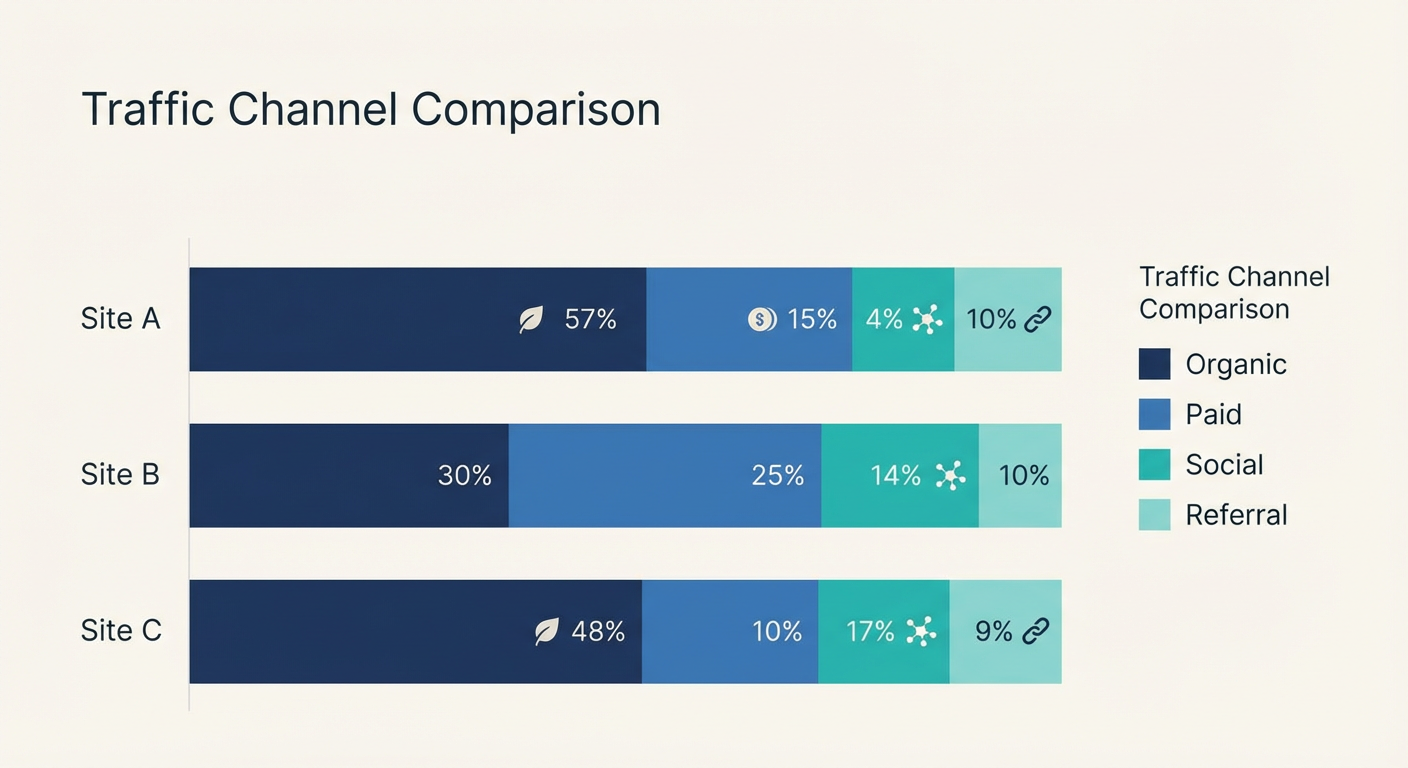
Organic search dominant (40%+). They've invested heavily in content and SEO. This traffic is "free" in the sense that it doesn't require ongoing ad spend, but it took months or years to build. If a competitor gets most traffic from organic, they've got a content moat. To compete, you'll need to invest in content too, or find channels they're ignoring.
Paid search dominant (20%+). They're buying their traffic. This is expensive but fast. If a competitor leans on paid search, they've found keywords that convert profitably. Check what keywords they're bidding on (the Google Ads Transparency Center will tell you, or see our guide to spying on competitor Google Ads) and you'll know exactly what they think their money keywords are.
Direct traffic heavy (50%+). People typing the URL directly or clicking bookmarks. Strong brand awareness, basically. You can't "compete" with someone's direct traffic per se, but it tells you they've been around long enough for name recognition. A newer competitor with low direct traffic? More vulnerable than they look.
Social traffic spikes. If social drives more than 10% of a competitor's traffic, they've figured out social distribution. Check which platform (SimilarWeb usually breaks this down). Heavy LinkedIn traffic? B2B content strategy is working. Heavy Reddit traffic? They've got a community play or they're running Reddit ads.
Referral traffic. This is the most underanalyzed channel. The top referring domains tell you exactly who's sending traffic. Partner sites, review platforms, affiliate programs, media coverage. If G2 or Capterra are top referrers, they're investing in review site presence. If a specific blog sends tons of traffic, they've probably got a partnership or guest posting arrangement.
Going Deeper With Paid Tools
If you want the full picture, SEMrush's Traffic Analytics is probably the best tool for this. It gives you historical trends, geographic breakdown, and page-level traffic estimates. You can see which specific pages on a competitor's site pull the most visitors, not just the domain total.
The historical trend is where things get really useful. A competitor whose organic traffic doubled in the last six months is doing something right in SEO. A competitor whose paid traffic dropped to zero just killed their ad budget, maybe because it wasn't converting. A competitor with steady traffic for 18 months and then a sudden spike probably launched something or got press coverage.
Turning Traffic Data Into Decisions
Once you have the data, the question is what to do with it. My cheat sheet:
- Competitor dominates organic, you're weak there? You need a content strategy. Check their top keywords and start building.
- Competitor gets heavy referral traffic from sites you've never approached? Those are partnership and link building targets.
- Competitor suddenly ramping paid spend? They probably found a converting funnel. Check their ads to see what's running.
- Competitor's traffic is declining? Either they're in trouble or they've shifted strategy. Worth investigating before you assume they're irrelevant.
Why Use an Agent for Traffic Analysis
Checking competitor traffic across SimilarWeb, SEMrush, and Ahrefs for three competitors takes at least an hour of tab-switching and screenshotting. And then you still have to make sense of all those numbers.
A website traffic checker agent does the aggregation in one pass. Give it your competitor list and it returns traffic estimates, channel breakdowns, and trends in a structured format you can actually use. Run a market intelligence agent alongside it and you get extra context: is the competitor doubling their marketing team while traffic climbs (investing in growth) or is traffic climbing with flat headcount (organic momentum)? Those are very different situations.
Your competitors' traffic data is the closest thing to reading their marketing strategy document. The channels they invest in, the ones they ignore, and the shifts over time tell you everything about how they grow. Go look.
Try These Agents
- Website Traffic Checker — Estimate competitor website traffic and break down their channel mix
- SEO Competitor Analyzer — Uncover what keywords competitors rank for and where the content gaps live
- Market Intelligence Agent — Full-spectrum competitor research covering hiring, reviews, keywords, and news
- PPC Competitor Analysis Tool — Spy on competitor ads across Google, Meta, TikTok, LinkedIn, and Reddit in minutes