
Best Lead Enrichment Tools in 2026: 10 Platforms Compared
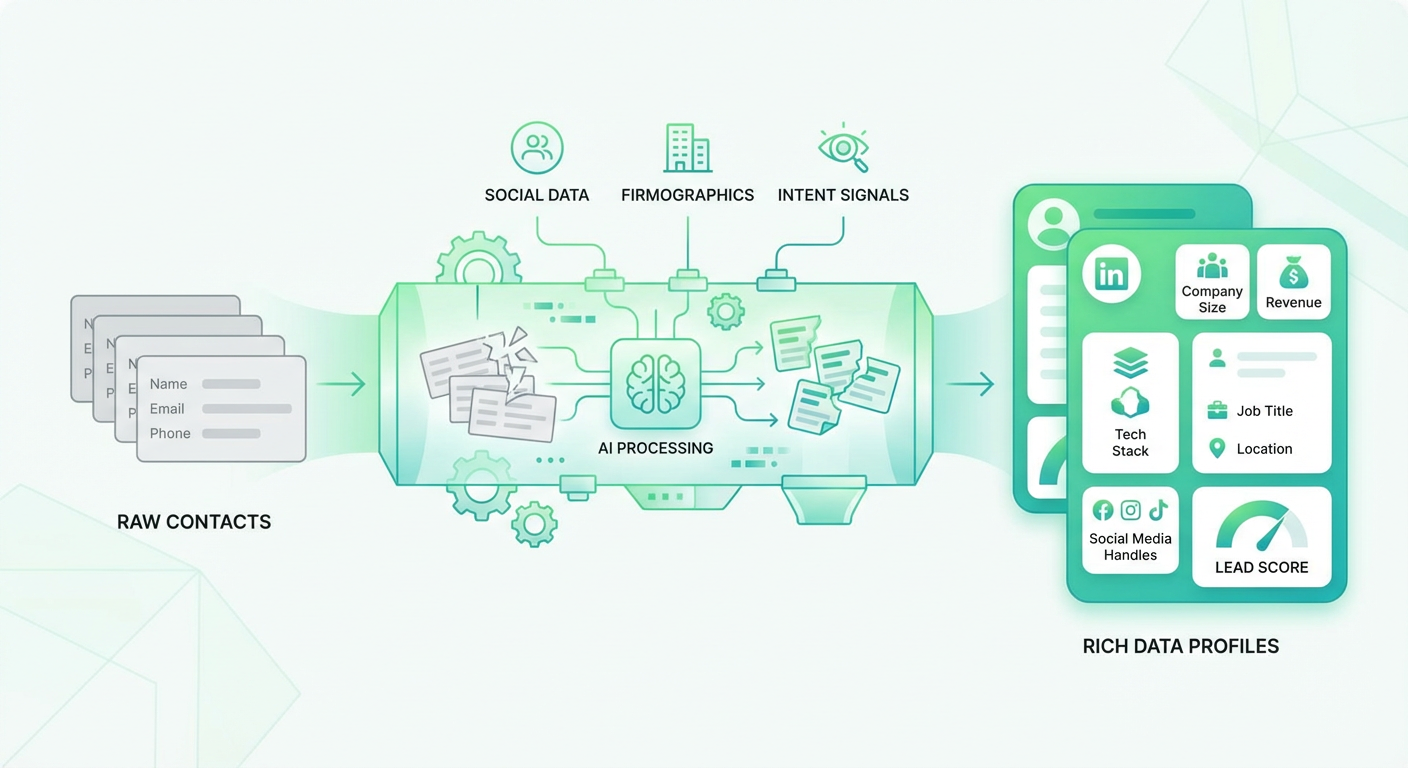
I pulled a report from our CRM last quarter. Of the 4,200 leads that came in through the website, 62% had nothing beyond a name and email address. No company size, no industry, no title. Our reps were spending the first three minutes of every lead follow-up just Googling the person to figure out if they were worth calling. Multiply that by 20 leads per day per rep and you're looking at an hour of daily research that should happen automatically.
Lead enrichment tools fix that gap. They take the minimal data you have — usually an email address — and fill in the rest: company name, employee count, industry, title, phone number, funding history, technology stack. The good ones do it in real time, as the lead enters your CRM. The Lead Enrichment agent on Cotera goes a step further: it enriches the record, analyzes the data, and tells your reps whether the lead matches your ICP and why. That analysis is the part that databases alone can't do.
Here's how 10 enrichment tools compare.
| # | Tool | Best For | Pricing |
|---|---|---|---|
| 1 | Cotera | AI-powered enrichment with lead analysis | Free tier available |
| 2 | Clay | Waterfall enrichment across 75+ sources | From $149/mo |
| 3 | Clearbit | Real-time company enrichment | Custom pricing |
| 4 | Apollo | Contact database with built-in enrichment | Free tier, paid from $49/mo |
| 5 | ZoomInfo | Enterprise-grade B2B data | Custom (typically $15K+/yr) |
| 6 | Lusha | Simple contact lookups | Free tier, paid from $49/mo |
| 7 | FullContact | Identity resolution & person data | Custom pricing |
| 8 | Cognism | GDPR-compliant European data | Custom pricing |
| 9 | Dropcontact | GDPR-native email enrichment | From $24/mo |
| 10 | Hunter | Email finding and verification | Free tier, paid from $49/mo |
1. Cotera
Free tier available
- AI agents that enrich leads and analyze ICP fit
- Cross-references 50+ data sources automatically
- Written qualification rationale, not just a score
- Custom agent builder — no code required
- Works with Salesforce, HubSpot, Pipedrive, Attio
Traditional enrichment tools fill in blank fields. Cotera fills in blank fields and then tells you what the data means. The Lead Enrichment agent takes an email address, resolves the person and company, pulls firmographics and technographics from multiple sources, and writes back a complete record. That's the table-stakes part. The difference is what happens next: the Lead Enricher & Qualifier agent scores the lead against your ICP criteria and explains why in plain English.
"Company is a Series B fintech with 120 employees, using Salesforce and HubSpot. They're hiring two SDRs this month and their VP of Sales just joined from a company that was already a customer. ICP score: 91." That's the kind of context that changes how a rep handles the first call. Clearbit or Apollo would have given you the employee count and industry. Cotera gives you the story.
The free tier is where I started, and I haven't needed to upgrade for our enrichment workflow. The agents run on demand or can be triggered when new leads enter the CRM. For teams that have already tried a basic enrichment provider and found themselves still researching leads manually, the agent approach bridges the gap between raw data and actionable intelligence.
2. Clay
From $149/mo
- Waterfall enrichment across 75+ providers
- Spreadsheet-style workflow builder
- AI agent for custom research at scale
- Integrates with CRMs, outreach tools, and databases
Clay's waterfall enrichment is the best approach to maximizing fill rates. Instead of relying on one data provider and accepting its gaps, Clay checks multiple providers sequentially for each data point. Need an email? It tries Clearbit, then Apollo, then Hunter, then three more. Need a phone number? Same waterfall. The result: fill rates that are 20-30% higher than any single provider achieves on its own. I've seen email coverage jump from 65% with one source to 92% using Clay's waterfall with five sources.
The spreadsheet interface is both the strength and the weakness. You get enormous flexibility — you can build custom enrichment pipelines, add conditional logic, chain lookups, and process data in ways no other enrichment tool allows. But the first time you open Clay, you'll spend an hour figuring out how columns, sources, and waterfalls connect. It's a power tool with a power tool's learning curve.
At $149/mo for 2,000 credits, Clay is expensive per-record compared to a database like Apollo. But the per-record quality is higher, and the flexibility to customize exactly what data you collect means you're not paying for fields you don't need. For teams that treat enrichment as a competitive advantage rather than a checkbox, Clay produces better results than anything else in this category.
3. Clearbit (now part of HubSpot)
Custom pricing
- Real-time enrichment on form submission
- Most accurate firmographic and technographic data
- Website visitor identification
- API-first with extensive documentation
Clearbit was the gold standard for real-time enrichment before HubSpot bought it. Someone fills out a form with just their work email. By the time the form submission reaches your CRM, Clearbit has already appended company size, industry, revenue range, technology stack, and the person's title and seniority. Your routing rules can immediately assign the lead to the right rep based on enriched data, not just the two fields the prospect bothered to fill in.
The company data accuracy is the best I've tested. Employee count, revenue estimates, industry classification, and tech stack detection are consistently more reliable from Clearbit than from ZoomInfo or Apollo on the company side. Person-level data is decent but not as comprehensive as ZoomInfo's for titles and phone numbers.
The HubSpot acquisition created uncertainty. Clearbit's API still works for non-HubSpot customers, but the long-term roadmap is unclear. If you're on HubSpot, Clearbit enrichment is likely rolling into your existing subscription. If you're on Salesforce or another CRM, you're betting on a product whose owner has every incentive to make it HubSpot-exclusive eventually. The data is still excellent. The strategic risk is worth considering.
4. Apollo
Free tier, paid from $49/mo
- 275M+ contact database with enrichment
- Bulk enrichment for existing CRM records
- Chrome extension for on-the-fly lookups
- Built-in sequencing to act on enriched data
Apollo handles enrichment as part of a larger prospecting platform. Upload a CSV of leads, and Apollo matches them against its 275 million contacts to fill in missing emails, phone numbers, titles, and company data. Or use the Chrome extension to enrich individual records from LinkedIn profiles. The enrichment isn't the product — it's bundled into a platform that also handles prospecting, sequences, and analytics.
The bulk enrichment is useful for cleaning up an existing CRM. We uploaded 3,000 contacts with patchy data, and Apollo filled in verified emails for about 85% and phone numbers for about 60%. The match rate depends heavily on your target market — enterprise contacts at well-known companies enrich well, while contacts at small or private companies often come back empty.
At $49/mo for the Basic plan with bulk enrichment credits, Apollo is the cheapest option for teams that need enrichment plus outreach in one tool. The per-record accuracy is lower than Clearbit or Clay, but the convenience of having enrichment, prospecting, and sequencing in a single platform saves time. If you're already using Apollo for prospecting, turning on its enrichment features is the obvious first step before adding a dedicated enrichment tool.
5. ZoomInfo
Custom pricing (typically $15K+/year)
- Largest B2B database with real-time updates
- Automated CRM enrichment with field mapping
- Email accuracy above 95%
- Org chart and buying committee data
ZoomInfo's enrichment runs on the largest B2B database available. Set up the CRM integration, define field mapping, and it automatically enriches new and existing records as data changes. Contact changes jobs? Record updated. Company gets acquired? Firmographics updated. It's the "set and forget" approach to enrichment, powered by a database that's genuinely more comprehensive than anything else.
The email accuracy above 95% is the stat that matters most for enrichment. If you're enriching thousands of records per month, the difference between 85% accuracy (Apollo) and 95% accuracy (ZoomInfo) means hundreds of fewer bounced emails and hundreds of more successful outreach attempts. For large sales teams where email deliverability directly impacts pipeline generation, that accuracy gap translates to real revenue.
The price is the filter. At $15K+ per year, ZoomInfo's enrichment costs more than every other tool on this list combined. The ROI works for enterprise teams with large databases and high outreach volume. For smaller teams, the combination of Apollo for base enrichment plus Clay for waterfall coverage on high-priority leads can achieve 90-95% of ZoomInfo's results at a fraction of the cost.
6. Lusha
Free tier, paid from $49/mo
- One-click contact enrichment from LinkedIn
- Email and phone with GDPR compliance
- CRM push with field mapping
- Bulk enrichment for contact lists
Lusha is enrichment at its simplest. Chrome extension on LinkedIn, click the button, get email and phone number, push to CRM. No waterfall configuration, no workflow builders, no AI analysis. The speed from "I need this contact's info" to "it's in my CRM" is maybe 15 seconds.
The bulk enrichment feature lets you upload a CSV and enrich contacts in batch, which covers the use case where you have a list from an event or marketing campaign and need to fill in missing fields before loading into the CRM. The match rate is comparable to Apollo — around 85-90% on emails, lower on phone numbers.
For individual reps who enrich 10-20 contacts per day through manual prospecting, Lusha's simplicity and speed are the product. For teams that need systematic enrichment of thousands of records, Lusha's credit-based pricing ($49/mo for 480 credits) gets expensive fast compared to Apollo's unlimited model or Clay's higher-quality waterfall approach. Lusha works best as a supplement to a broader enrichment strategy, not the strategy itself.
7. FullContact
Custom pricing
- Identity resolution across emails, phones, and social profiles
- Person and company enrichment API
- Privacy-safe data matching
- Real-time enrichment on form submission
FullContact approaches enrichment differently than a contact database. Instead of maintaining its own repository of contact records, it resolves identities across data sources. Give it an email address and it connects that identity to social profiles, phone numbers, location data, and company affiliation by linking records across providers. The result is a unified profile that pulls data from wherever it exists, rather than from a single database.
The identity resolution is useful when you have fragmented data. A lead fills out a form with a personal Gmail address. FullContact can often resolve that to their work identity, connecting the personal email to their professional profile, company, and title. That's a capability that traditional enrichment tools struggle with — they need a work email to start the lookup.
FullContact's pricing is custom and API-based, which means you're paying per resolution. The data quality on person-level attributes is solid but the company data is less comprehensive than Clearbit or ZoomInfo. FullContact is the right choice for teams with identity fragmentation problems — consumer-facing products, freemium models, or event-based lead capture where people use personal emails. For standard B2B enrichment where you already have work emails, the traditional providers are more straightforward.
8. Cognism
Custom pricing
- Phone-verified mobile numbers (Diamond Data)
- GDPR-compliant enrichment for European contacts
- Global coverage with European depth
- Bombora intent data included
Cognism is the enrichment provider you choose when GDPR compliance isn't optional. The database is built with European data regulations at the foundation — contacts are checked against do-not-call lists, consent tracking is built in, and data handling follows GDPR requirements. If you're enriching European leads and loading them into a CRM, using a GDPR-compliant source reduces your regulatory exposure.
The Diamond Data phone numbers are manually verified within 90 days. For teams that rely on phone outreach, the difference between Cognism's verified numbers and Apollo's database numbers is measurable in connect rates. I've seen connect rates roughly double when using Diamond Data compared to standard phone data from other providers.
Cognism's enrichment coverage in Europe is broader than ZoomInfo's or Apollo's for certain markets (UK, DACH, Nordics especially). US coverage exists but isn't as deep. For teams enriching leads across multiple geographies, Cognism handles Europe while Apollo or ZoomInfo handles North America. The pricing is custom and mid-tier — less than ZoomInfo, more than Apollo.
9. Dropcontact
From $24/mo
- Email finding and verification without a database
- GDPR-compliant by design — no stored personal data
- CRM integration for automated enrichment
- Duplicate detection and data cleaning
Dropcontact takes a fundamentally different approach to enrichment: it doesn't maintain a database of contacts. Instead, it algorithmically finds and verifies email addresses in real time using publicly available sources. The GDPR angle is built into this architecture — since Dropcontact doesn't store personal data in a database, it avoids the consent and data retention issues that plague providers with large contact repositories.
The CRM integration is clean. Connect it to your HubSpot, Salesforce, or Pipedrive, and Dropcontact automatically enriches new contacts as they enter the system. It finds email addresses, verifies them, standardizes company names, detects duplicates, and updates job titles. The data quality on email addresses is high — verification happens at the time of lookup, not from a cached database entry that might be months old.
At $24/mo for 1,000 enrichments, Dropcontact is one of the cheapest options available. The limitation is scope: it's primarily an email enrichment and verification tool. It doesn't provide phone numbers, firmographic data, or technology stack information. For teams that need email addresses found and verified with GDPR compliance, Dropcontact is purpose-built. For full-profile enrichment, you'll need to pair it with another tool.
10. Hunter
Free tier, paid from $49/mo
- Domain-based email search and verification
- Email pattern detection for companies
- Bulk email finding from domain lists
- Chrome extension and API access
Hunter has been finding email addresses since 2015 and the core product hasn't changed much because it doesn't need to. Type in a company domain, Hunter shows you the email pattern (firstname@company.com, first.last@company.com) and lists verified email addresses associated with that domain. Add a person's name and it generates the most likely email address based on the pattern, then verifies it.
The domain search is where Hunter is genuinely useful. You're targeting a company, you know the person's name, and you need their email. Hunter gets it right 80-85% of the time, and when it gets it wrong, the verification catches it before you send a bouncing email. The bulk finder lets you upload a spreadsheet of names and domains and get emails back in minutes.
At $49/mo for 500 searches, Hunter is focused and affordable. It doesn't try to be a full enrichment platform — no phone numbers, no firmographics, no company data. Just email addresses, found and verified. Many teams use Hunter as one layer in a broader enrichment workflow: Hunter for email discovery, Lusha or Cognism for phone numbers, Clearbit for company data. It does one thing and has been doing it well for a decade.
How to Choose
Different enrichment problems need different solutions.
Need to fill in empty CRM fields automatically? Clearbit for real-time enrichment on form submission (best company data). Apollo for affordable bulk enrichment from a large database. ZoomInfo if accuracy is worth the premium.
Need the highest possible fill rates? Clay's waterfall approach checks 75+ sources per record. Nothing else achieves that coverage. But you'll pay per credit and invest time learning the platform.
Need analysis, not just data? Cotera's Lead Enricher & Qualifier enriches the record and explains what the data means for your deal. Databases give you employee count. Cotera gives you context.
Need GDPR compliance? Dropcontact for email enrichment without a stored database. Cognism for full contact enrichment with verified European data.
Just need email addresses found and verified? Hunter has been doing it for a decade for $49/mo.
Most teams outgrow a single enrichment provider eventually. The winning approach is usually a primary provider for base coverage (Apollo, ZoomInfo, or Clearbit) plus a secondary tool for gap-filling (Clay for waterfall, Hunter for email verification, Cotera for analysis). Match the tools to the gaps in your current data.
Try These Agents
- Lead Enrichment — Enrich leads with firmographics, technographics, and company data
- Lead Enricher & Qualifier — Enrich and score leads against your ICP with written analysis
- Hunter Contact Finder — Find and verify email addresses at target companies
- Apollo Bulk Enrichment — Bulk enrichment of contact lists using Apollo data